
📘 What it is
HeyReach is a LinkedIn outreach tool. Once connected, Lymera sends it leads and receives notices of accepted connections and received messages through webhooks.
Only one LinkedIn tool can be active per company in this category. Lymera validates the token before saving it and stores it encrypted.
📍 Where to find it
Side menu › SETUP › Integrations › LinkedIn category › HeyReach card.
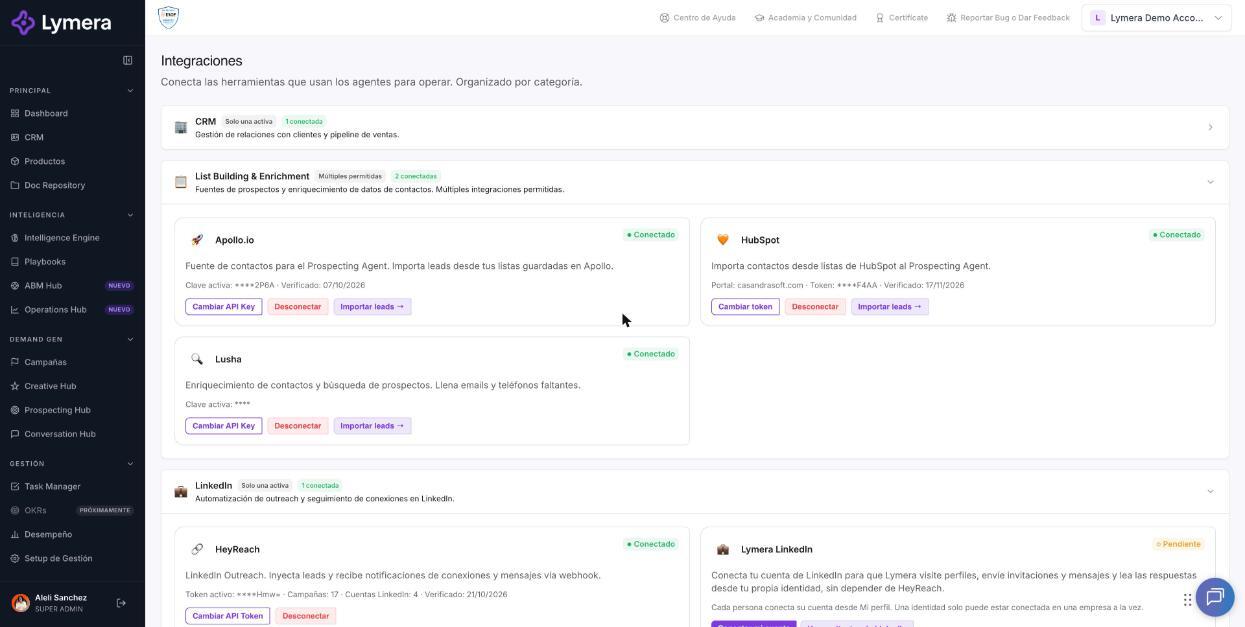
Screen: 1.05 How to connect your HeyReach account
🛠️ How to do it
Before you start
- Have an active HeyReach account.
- Have a session in Lymera with permission to connect integrations (Account Admin).
Step 1: Get the API Token in HeyReach
- Sign in to HeyReach and go to Settings.
- Open the API section.
- Generate a new token and copy it. It is a 44-character string that ends in “=”.
Step 2: Connect HeyReach in Lymera
- Go to SETUP › Integrations.
- On the HeyReach card, click Connect HeyReach.
- Paste the token in the HeyReach API Token field and confirm.
- Wait for the message “HeyReach connected.”
Step 3: Create the 2 webhooks in HeyReach
- On the Lymera card, copy the Webhook URL.
- Click 🔑 Show Secret and copy the Webhook Secret.
- In HeyReach go to Settings › Integrations › Webhooks › Add webhook.
- Create two webhooks, both with All Campaigns: one for Accepted connections and one for Received messages.
- In each one, add the Secret under Advanced › Custom headers.
- Go back to Lymera and click I have set up the webhooks ✓.
Available campaigns and profiles
The LinkedIn campaigns and profiles you can use are enabled by the Lymera team. If you don't see the ones you expect, ask your Customer Success contact.
Change or disconnect
- To change the token, use Change API Token. A new Webhook Secret is generated: update it in the 2 HeyReach webhooks.
- To disconnect, use Disconnect. Active campaigns with the LinkedIn channel are paused automatically and Lymera tells you how many.
❓ Frequently asked questions
❓ Does connecting HeyReach use Lymera credits?
No. Connecting and maintaining the integration does not use your plan's credits.
❓ Can I have HeyReach and Lymera LinkedIn at the same time?
Both can exist in the same account, but each campaign uses only one provider. It is chosen in the campaign's LinkedIn provider setting.
❓ I get an error when pasting the token. What should I do?
It is almost always a space at the beginning or end, or a token that was deleted in HeyReach. You will see “Invalid API Token.” Generate a new one in HeyReach and paste it again.
❓ Who can connect HeyReach?
The Account Admin or your CSM, if it is a managed add-on.
🔧 If something doesn't work
| What you see | Likely cause | What to do |
|---|---|---|
| “Invalid API Token.” | Token copied incorrectly or deleted | Generate a new one in HeyReach and paste it without spaces |
| “The credential could not be decrypted. Reconnect HeyReach.” | The credential is corrupted | Reconnect with the token |
| Accepted connections and messages don't arrive | Webhooks are missing or the Secret doesn't match | Check that the 2 webhooks exist and have the Secret in the header |
| “The webhook secret has not been generated yet.” | The connection was left incomplete | Ask an administrator to reconnect HeyReach |
| “Only the Lymera team can enable HeyReach campaigns and profiles.” | This is an action reserved for Lymera | Ask your Customer Success contact |
| Campaigns paused after disconnecting | This is the expected behavior | Reconnect and resume the campaigns |
If the problem continues, write to support with your company name, the time and the exact message. Never share the full token.