
💳 What are Lymera credits?
Credits are the unit of measure Lymera uses to process searches, data enrichment and automations with Artificial Intelligence. Every operational action in the platform requires a certain number of credits.
If you are on the Starter Plan, you will receive a fixed pool of credits at the start of your monthly cycle so you can operate on your own.
📊 Cost per AI action
This is what the system deducts for the most common actions. Some ABM Hub features cost between 1 and 8 credits depending on the action, and many screens show the cost next to the button (for example, “Generate Weekly Status · 30 credits”).
| Action | Cost |
|---|---|
| Automatic AI reply (email) | 1 credit |
| LinkedIn message sent | 1 credit |
| AI turn on LinkedIn | 1 credit |
| Personalized email sent | 2 credits |
| Creative content generated with AI | 2 credits |
| Recalculate ICP Score | 2 credits |
| Brand Voice analyzed | 3 credits |
| Contact prospected (research + notes) | 3 credits |
| Playbook generated — per section | 7 credits |
| WhatsApp conversation with AI (per window) | 8 credits |
| Analyze / Forecast (Operations Agent) | 10 credits |
| Translate an Intelligence Engine piece | 10 credits |
| Intelligence Engine document — per section | 11 credits |
| Weekly Account Status (Operations Hub) | 30 credits |
🔌 Native credits and add-ons (Apollo / WhatsApp)
Lymera integrates with your favorite tools. To avoid unexpected charges or interruptions, usage is managed separately for each platform:
Native Lymera credits
They are used for all the AI actions in the table above and are deducted from the monthly balance of your plan.
Apollo credits (add-on)
They do not use your Lymera balance. Extracting contacts from Apollo deducts credits from the Apollo account you linked with the API key.
WhatsApp credits (add-on)
Lymera automates sending and qualification (which uses 8 Lymera credits), but the cost of the messaging channel is applied to your Meta / WhatsApp Business account.
📍 Where to see your balance
- In the left side menu, go to the SETUP group and open Account & Billing.
- Select the Billing tab.
- Check the Lymera credits for the cycle box: it shows your available and used credits. Below it you will see the balance of your active add-ons, such as Apollo and WhatsApp Messaging.
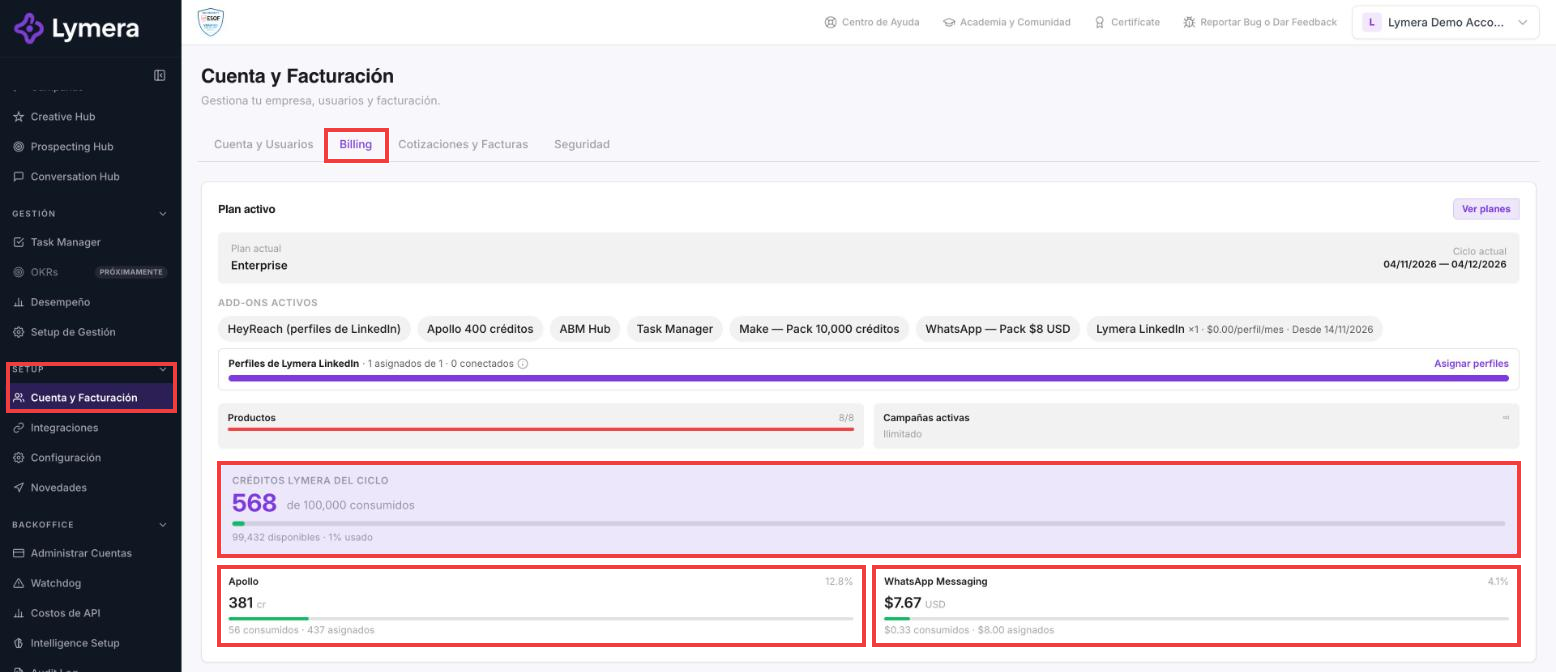
Billing tab in Account & Billing with Lymera, Apollo and WhatsApp credits
❓ Frequently asked questions
❓ Do credits I didn't use during the month roll over to the next cycle?
No. The native credits of your subscription reset at the start of each monthly billing cycle. Unused credits expire and are not carried over to the next month.
❓ Where can I see how many credits I have left?
In SETUP › Account & Billing › Billing, in the Lymera credits for the cycle box. There you can see what is available and what has been used, and below it the balance of your active add-ons.
❓ What happens if I run out of credits mid-month? Can I buy more?
Yes. If you use up your credits before your renewal date, you can buy additional credit packs from your billing panel:
- For a one-time campaign (single use): the pack stays active until your next billing cycle, with no automatic renewal.
- For permanent growth (recurring): you can set the pack to apply every month together with your subscription charge.
There are several packages so you can choose the scale that best fits your operation.
🚀 Next steps
Now that you know how to look after your credits, connect your external tools without the risk of interruptions: