
# Operations Hub - what it includes, who can access it and what depends on your plan
📘 What it is
The Operations Hub is the entry point to the revenue intelligence of your operation: reports, a performance panel and AI diagnostics. You can recognize it by the text "Operations Agent" above the title.
Three sections:
- Revenue Reports: Pipeline Tracker, Sales Performance, Sales Rep Performance and Marketing Performance.
- Performance Panel: Funnel · Steps · Day by day, Segments and ICP calibration, Content and senders.
- AI Diagnostics: Analysis Center, Weekly Account Status and Watcher Alerts.
Current status: Pipeline Tracker, Sales Performance, Sales Rep Performance, Marketing Performance and Weekly Account Status are available. The Performance Panel cards, the Analysis Center and the Watcher Alerts appear as "Coming soon" ("Announced for an upcoming release; it can't be opened yet.").
At the top there is a Last 30 days strip with Handoffs, Meetings booked, Open opportunities and Won value (and Reach · enrolled), with ⓘ help icons and a click to see the detail in the Prospecting Hub.
📍 Where to find it
Side menu, Intelligence group > Operations Hub (it may show the New label). This module is activated per account: if you don't see it, ask your Customer Success contact to activate it.
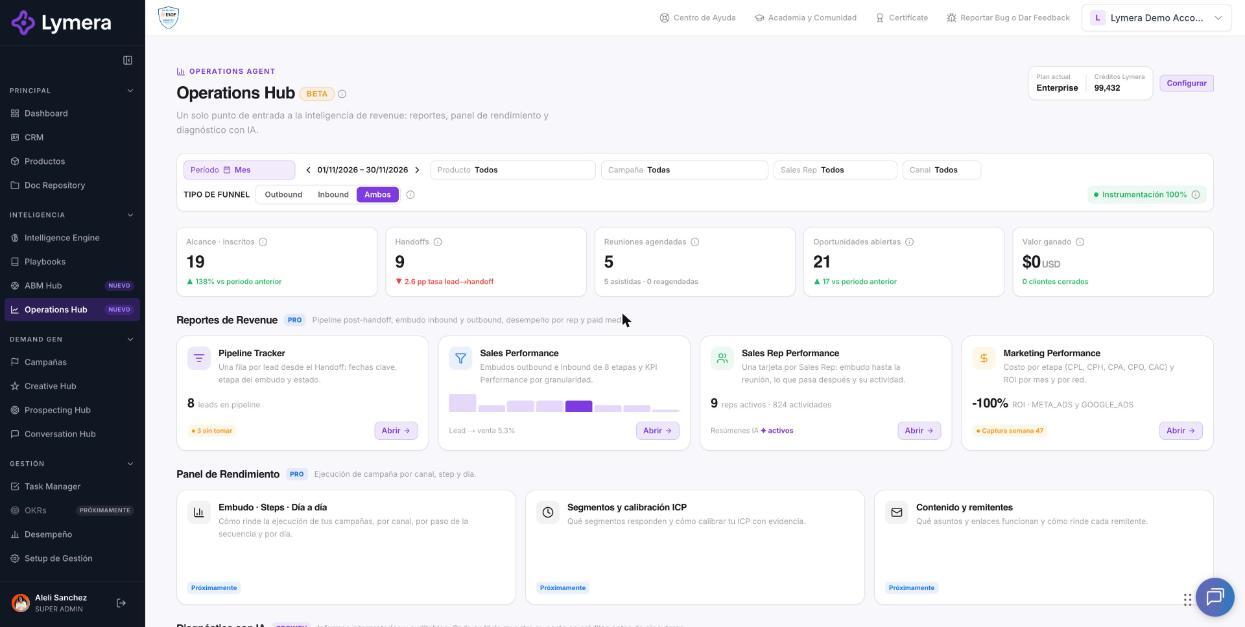
Screen: Operations Hub - what it includes, who can access it and what depends on your plan
Availability: plan and role
- Plan: the reports and the base panel unlock from the Pro plan ("Unlock with Pro"); the AI layer (Analysis Center, Weekly Status, Alerts, Segments and Content) unlocks from Growth ("Unlock with Growth"). When your plan doesn't include it, the card shows a lock and the Upgrade plan or View my plan button. If the subscription is inactive you will see "Inactive subscription".
- Role: some cards are blocked by role ("🔒 Blocked by role"). When you click one, "Your role doesn't have access to this section" appears with the reason and "Ask your Account Admin for access.":
- Sales Rep: sees their own performance and their own leads, not campaign aggregates or settings. - Creative Rep: works on messages and demand; can open Marketing Performance and the Weekly Status (read-only), but not the named commercial pipeline. - Marketing Strategy Owner: leads demand generation; cannot open the individual performance of Sales Reps.
- Some roles (for example, Project Manager) have no access to the Hub: they see "Your role doesn't have access to the Operations Hub."
- When you see "Only your leads", the reports show only what belongs to you.
🛠️ How to do it
- Go to Intelligence > Operations Hub.
- Use the Operations Hub filters bar: Period, Product, Campaign, Sales Rep and Channel. The Instrumentation N% indicator shows the share of sent emails with the tracking pixel and tracked links; from 95% the open and click rates are reliable.
- Open the card you need with Open.
- For settings (account considerations and default project for tasks) click Configure (Account Admin and Revenue Strategy Owner only).
❓ Frequently asked questions
Why does a card say "Insufficient data"? Because there is not yet enough data to calculate that report in your account.
Why does a card say "Available in Growth"? Because that feature needs the Growth plan. Use Upgrade plan or check with your Customer Success contact.
Who sees my leads in the reports? Each role sees what applies to it; a Sales Rep sees only their own.
What do "Cohort" and "Flow" mean? Cohort follows the leads that entered during the period up to today (useful for measuring real conversion; recent periods are still maturing). Flow counts what happened within the period (useful for seeing activity and volume).
Does the won value include opportunities in another currency? It is added up in the account's primary currency; an opportunity in another currency without an exchange rate is not added, and the report warns you.
🔧 If something doesn't work
- I don't see "Operations Hub" in the menu. Causes: the feature isn't activated in your account or your role has no access. Ask Customer Success for activation or ask your Account Admin for permission.
- Message "We couldn't load the Operations Hub. Please try again." Click Retry; if it persists, escalate.
- The figures look different from other screens. Check the period, the basis (Cohort/Flow) and the active filters (chips). If they still don't match, escalate with: company, user, URL, filters used, time, expected figure vs. figure seen, and a screenshot.
- Doubtful open or click rates. Check the Instrumentation indicator: below 95% the rates may not be reliable.