
# Operations Hub - Weekly Account Status and settings
📘 What it is
The Weekly Account Status is the week's report for your operation: KPIs by product, sales activity day by day, handoffs, replies and what to do on Monday. Each status is kept as it was generated. It is generated with AI and uses credits; the cost is shown before you confirm.
Sections of the document: Executive summary, Campaign KPIs by product (compared with the previous week), Sales activity day by day, WhatsApp: manual vs sequence, This week's handoffs, Real replies this week, HOT leads and handoff follow-up, What to fix in your operation, What depends on Lymera, Recommendations and Exclusions applied.
The Operations Agent settings store the account considerations: facts about your operation that the report applies before judging a figure (who works whose leads, test domains to exclude, campaigns paused on purpose). One per line.
📍 Where to find it
- Intelligence > Operations Hub > AI Diagnostics > Weekly Account Status. Available from the Growth plan.
- Settings > Operations Agent settings, or the hub's Configure button. Only the Account Admin and the Revenue Strategy Owner configure the Operations Agent.
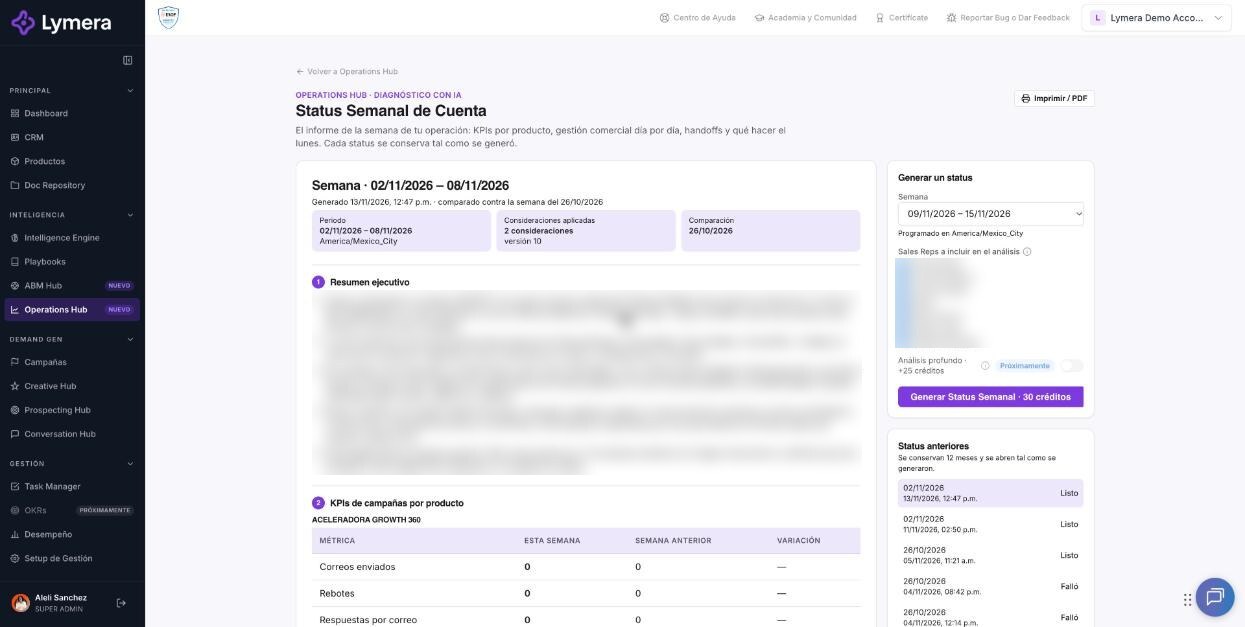
Screen: Operations Hub - Weekly Account Status and Operations Agent settings
🛠️ How to do it
Generate a status
- Go to Weekly Account Status. If there are none, you will see "There are no statuses yet. Choose the week and generate the first one."
- Under Generate a status, choose the Week (the current one is marked).
- Optional: turn on Deep analysis (costs additional credits; adds engagement, objections against your IE and playbooks, sales tracker and recommendations by product).
- Under Sales Reps to include in the analysis, remove anyone who isn't actively prospecting (for example, an SDR in delegated prospecting). By default everyone who had logins or activity during the week is included.
- Click Generate Weekly Status (the button shows the credits). In the dialog, review the current balance and the balance after, and confirm with Generate.
- You will see "Generating the status for the week of…", which usually takes 1 to 3 minutes; you can leave the screen. When it finishes: "Weekly Status generated. N credits were debited."
- Use Print / PDF to export. Previous statuses are kept for 12 months and open as they were generated; Back to the latest returns to the most recent one.
If generation fails, "We couldn't generate the status." appears and the credits are refunded; use Retry. If you don't have enough balance you will see "Insufficient balance: you need N credits and have M." and nothing is charged.
Save account considerations
- Go to Operations Agent settings and click Edit under Account considerations.
- Write one consideration per line (there is a maximum number of lines and characters, shown on the screen) and click Save. Each save creates a new version; View previous versions lists them with author and date.
- The Weekly Status and the Watcher use them.
Turn findings into tasks
Tasks that originate in the Operations Hub are internal Management > Tasks tasks and are created in the Default project you choose in these settings. On the Pro and Starter plans this feature requires the Task Manager add-on (contracted in Account & Billing); on Growth it is included. In the task detail you will see "Created from Weekly Status" (or another origin).
The Watcher thresholds, Who to notify and Evidence rules panels appear as "Coming soon".
❓ Frequently asked questions
Who can generate the status? Roles with permission. Others can read it, but the button is disabled ("Your role can read statuses, not generate them").
Is it scheduled automatically? The screen shows "Scheduled in {time zone}" as a reference; to find out whether your account has automatic scheduling, check with your Customer Success contact.
Can I report something odd in the report? Yes, with the Report to Lymera button, which opens the support form with the steps to reproduce and what you expected.
Am I charged if the status fails? No: the credits are refunded.
Can two people edit the considerations at the same time? The second person receives "Someone else updated the considerations. Reload to see version N."
🔧 If something doesn't work
- I don't see "Weekly Account Status" or it is locked. It requires the Growth plan ("Available in Growth"); use Upgrade plan or check with your Customer Success contact.
- It stayed on "Generating…" for a long time. Wait a few minutes and reload; if it continues, escalate with company, user, week, start time, URL and a screenshot. Also check whether credits were deducted.
- I can't choose a default project. Task Manager is missing: "Available with Task Manager: enable the module to choose a default project."
- "Only the Account Admin and the Revenue Strategy Owner configure the Operations Agent." Ask one of them to make the change.