
# Intelligence Engine — what it is and how to complete it
📘 What it is
The Intelligence Engine (IE) is "the brain behind all your agents": the master context of each product you sell. There you describe what you sell, to whom, with what voice and with what communication strategy. With that information, Lymera generates the documents that playbooks, sequences and sales agents then use.
Each product has its own IE, made up of four modules that are completed in this order:
- Intelligence Engine ("Diagnostic Form" tab): the strategy form that you fill in.
- Audiences & Offers: the AI generates the Product Brief, the High-Value Promise, the ICP (ideal customer profile) and the Buyer Personas.
- Brand Voice Profile: you define your brand's tone, vocabulary and style.
- Communication & Funnels: the AI generates the Communication Lines, the Funnel Strategy and the Creative Concept.
When all four modules are complete, the IE reaches 100% and the "IE Complete" badge appears. At that point the product becomes Active and playbooks and agents are enabled.
📍 Where to find it
- Side menu → Intelligence group → Intelligence Engine.
- You will see the title "Intelligence Engine" with the subtitle "The brain behind all your agents. Set up the context of each product." and one card per product with its progress percentage.
- When you open a card you enter the product detail page, with four tabs: Diagnostic Form, Audiences & Offers, Brand Voice Profile and Communication & Funnels.
- At the top you will see the "IE Progress" bar with the count of saved and approved modules, and the ↓ Export button.
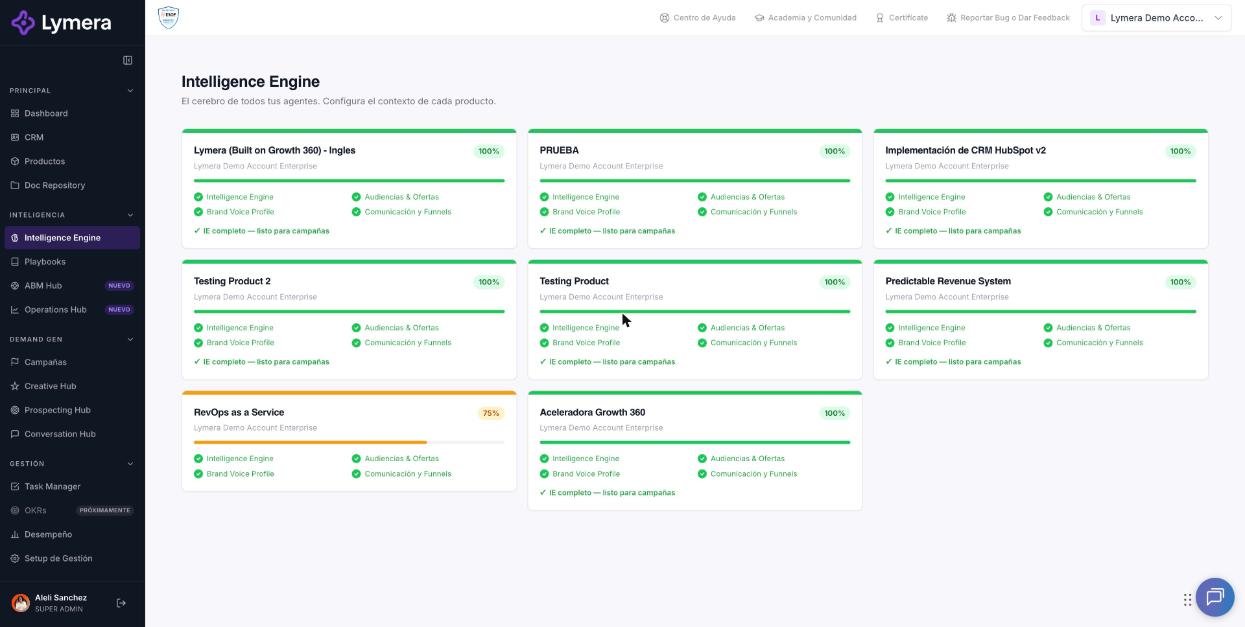
Screen: Intelligence Engine — what it is and how to complete it
🛠️ How to do it
- Go to Intelligence Engine and open the product's card. If you don't have products yet, use "Create first product →" (see the Products article).
- Complete and save the Diagnostic Form tab (article "IE: Diagnostic Form").
- Generate, review and approve Audiences & Offers.
- Complete the Brand Voice Profile.
- Generate and approve Communication & Funnels.
- Each module goes through review and approval (article "IE: review, approval and versions"). When you reach 100% you will see the notice "Intelligence Engine 100% Complete — All agents are ready to activate" with the "🚀 Activate Agents Now" button.
Who can view and edit it
- Viewing the IE: available depending on your role (Account Admin, Revenue Strategy Owner, Marketing Strategy Owner and Sales Rep can view it).
- Editing, generating and approving: Account Admin, Revenue Strategy Owner and Marketing Strategy Owner. If your role can only view, you will see the notice "Read-only: your role can view the Intelligence Engine but cannot edit or approve it."
- AI generation requires your plan to include the Intelligence Engine, your subscription to be active and you to have credits available. If you can't see it or it won't let you generate, ask your Account Admin to review your plan and role.
❓ Frequently asked questions
Why is my product still "In setup"? Because its IE is not at 100%. A product becomes "Active" when its four modules are complete.
Is the IE shared between products? No. Each product has its own IE, its own playbooks and its own sequences.
Can I leave the screen while the AI generates? Yes. Audiences and Funnels generations continue in the background and the result appears when it finishes.
If I edit a module that is already finished, what happens to the others? The modules that depend on it show "This module needs review — a module it depends on was updated". Review them and, if they are still correct, click "Mark as reviewed".
What happens if the IE of an active product drops below 100%? The product goes back to "In setup" and its campaigns are paused until it is complete again.
Can I see the IE of another company in my account? Each browser tab works with one company at a time; switch company from the account selector and open the IE again.
🔧 If something doesn't work
- "Your current role does not have permission to view the Intelligence Engine" → your role doesn't include this module. Ask your Account Admin to review your role.
- My product doesn't appear in the list → confirm you are in the right company and that the product is not deleted or archived.
- Message "Your current plan does not include the Intelligence Engine or your subscription is not active" → ask your Account Admin or your Customer Success contact to review the plan and subscription.
- Message "We couldn't connect to the database server… try again in about 5 minutes" → wait and try again. If it persists for more than 15 minutes, escalate.
- Escalate to a person when the problem repeats after reloading. Ask for: company name, user (email), product, screen URL, approximate time, steps taken and a screenshot of the message.