
# ABM Hub - what it is, how you work in it and why it may not appear
📘 What it is
The ABM Hub is Lymera's space for working target accounts (Account-Based Marketing). The core idea is that the account is the unit of work: its buying committee, what Lymera has learned about it, its scores and its campaigns hang from the account, and each contact is a node inside it.
On the screen you will see the title ABM Hub with the text "Account-Based Marketing" and two blocks:
- The process (how a target account is worked, in order): Verticals, Frameworks, Target lists, Target Accounts, Programs and Portfolio. They follow that order because each step builds on the previous one; for example, when promoting an account you must assign it a vertical, and the committee and health depend on the frameworks.
- Day to day (what the team handles every day): My queue today and Alerts.
Each card shows a short description and, when applicable, a figure such as "N pending approval", "N lists" or "N Target Accounts".
Current status of the cards: Verticals, Frameworks, Target lists and Target Accounts can be opened. Programs, Portfolio, My queue today and Alerts appear with the "Coming soon" label and cannot be opened yet.
📍 Where to find it
- Side menu, Intelligence group > ABM Hub. While the feature is recent it may show the New label.
- From an account record in CRM > Accounts there are View in ABM Hub and Promote to Target Account buttons.
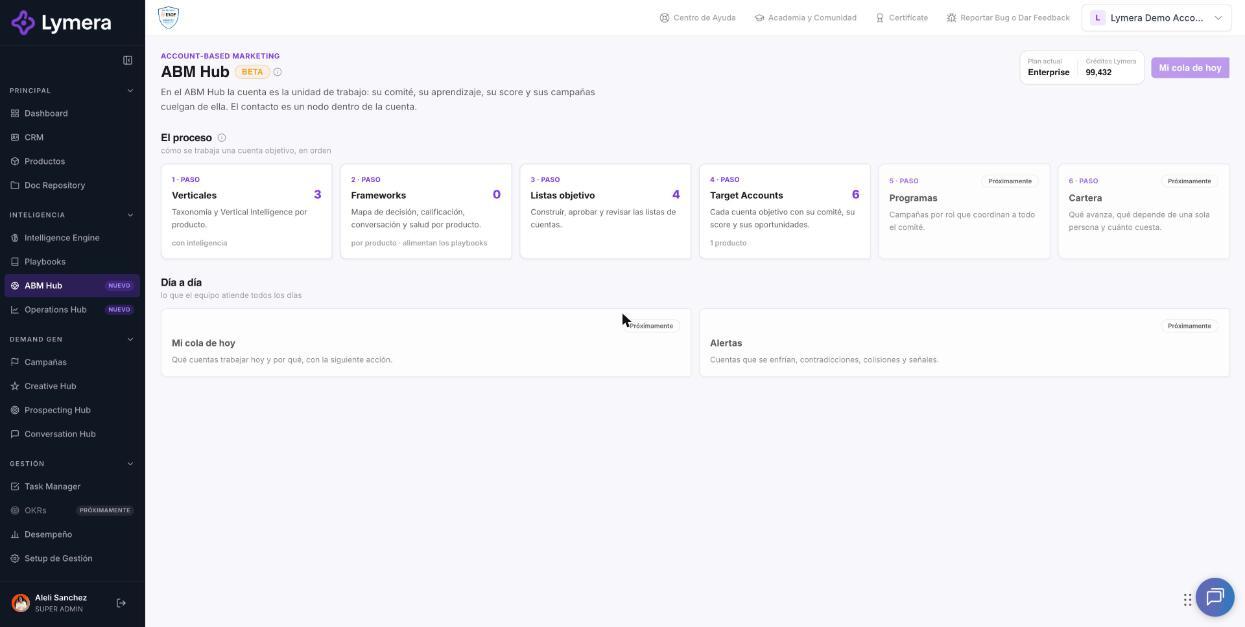
Screen: ABM Hub - what it is, how you work in it and why it may not appear
🛠️ How to do it
- Go to Intelligence > ABM Hub.
- Open Target lists to create or review account lists (see the target lists article).
- Open Target Accounts to see the accounts you already work per product (see the listing and record article).
- Inside each account use its sections: Summary, Entry plan, Research and signals, Learning, Committee map, Coverage and gaps, Deal health, Opportunities and Communications.
Availability: plan, role and activation
- The ABM Hub is included in the Enterprise plan or can be purchased as an add-on on any plan. While it is not active, you see the full Hub with dimmed, locked cards, a notice "The ABM Hub is included in Enterprise or as an add-on", and the Go to Accounts in the CRM and Unlock buttons.
- Unlock opens WhatsApp in a new tab with a ready-made message for Lymera support (with your company, your name and your email). Nothing is sent until you send it.
- It is a feature that is activated per account. If your plan includes it and you still don't see it in the menu, ask your Customer Success for activation.
- In addition to activation, your role must have access. Available depending on your plan and role; if you don't see it, ask your Account Admin to review your permissions. Some roles (for example, Project Manager) don't have access and see "Your role doesn't have access to the ABM Hub."
❓ Frequently asked questions
What is the difference between a CRM Account and a Target Account? A CRM account is any company registered with its contacts and history. A Target Account is an account that entered a target list for a product and is worked with a committee, scores and a plan.
Can an account be a target for several products? Yes. It appears in each product as a separate Target Account, and if two products have different owners, both are notified.
Why can't I open Programs, Portfolio, My queue today and Alerts? Because they are announced for a later version and appear as "Coming soon".
Does approving a list send emails or use credits? No. Approving only enables its accounts to be enrolled in a program.
What happens if I switch company in another browser tab? Each tab works with its own company. If one company has the Hub active and another doesn't, each tab will show its own status.
🔧 If something doesn't work
- I don't see "ABM Hub" in the menu. Common cause: the feature is not activated on your account or your role doesn't include it. Check your plan and your role; ask Customer Success for activation or your Account Admin for permission.
- I see the cards with a lock. Your plan doesn't include the ABM Hub yet. Use Unlock or contact Customer Success.
- Message "We couldn't load the ABM Hub. Please try again." Click Retry. If it persists, escalate to a team member and provide: company name, user (email), URL, approximate time of the error, steps you followed and a screenshot.
- A card says "Coming soon". It is not an error: that section is not available yet.