
📘 What it is
Apollo.io is a contact source for Lymera's Prospecting Agent. Once you connect it with an API Key, you can import leads from your saved lists in Apollo and bring them into your campaigns.
Lymera validates the key with Apollo before saving it and stores it encrypted. You need an Apollo account on the Basic plan or higher.
📍 Where to find it
Side menu › SETUP › Integrations › List Building & Enrichment category › Apollo.io card.
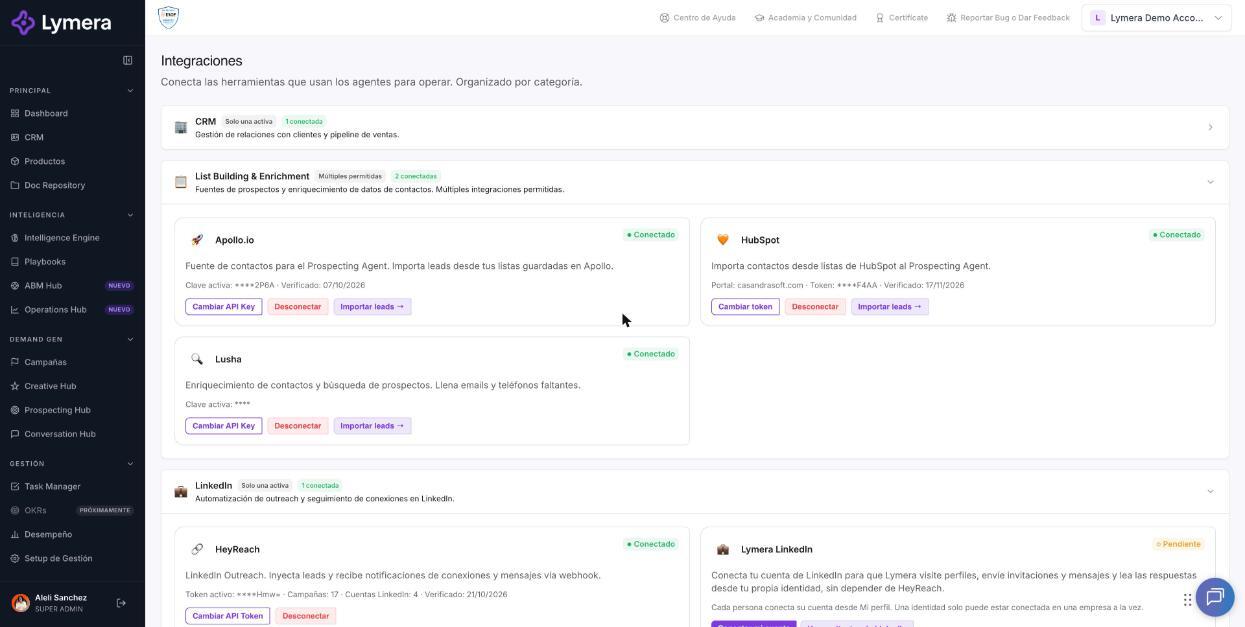
Screen: 1.02 How to connect your Apollo account
🛠️ How to do it
Before you start
- Have administrator access and an active session in your Apollo account.
- Have an active session in Lymera with permission to connect integrations (Account Admin).
Step 1: Get the API Key in Apollo
- Sign in to Apollo and go to Settings.
- Go to Integrations and open the API section (in some versions it appears as API Keys).
- Create a new key with an easy-to-recognize name, for example “Lymera Connection”.
- If Apollo asks you to choose the key type, select Master Key, so Lymera can read your contact lists.
- Copy the key. It has 22 alphanumeric characters.
Step 2: Connect Apollo in Lymera
- In the side menu, go to SETUP › Integrations.
- On the Apollo.io card, click Connect Apollo.
- Paste the key in the Apollo API Key field and confirm with Connect.
- Wait for the message “Apollo connected successfully.”
Import leads
With Apollo connected, click Import leads → on the same card to choose the list you want to bring in.
Change or remove the key
- To change it, click Change API Key, paste the new one and confirm with Update.
- To disconnect, click Disconnect. Whatever you already imported is kept.
❓ Frequently asked questions
❓ Where do I see my Apollo credits?
On the Apollo.io card, next to the plan, under SETUP › Integrations.
❓ Does connecting Apollo use Lymera credits?
No. Connecting and validating the key does not cost Lymera credits. Apollo credits depend on your plan in Apollo.
❓ Who can connect Apollo?
The Account Admin of your account. If the connection is a managed add-on, your CSM.
❓ What happens if I disconnect Apollo?
The leads you already imported are kept. To import again you will need to reconnect.
🔧 If something doesn't work
| What you see | Likely cause | What to do |
|---|---|---|
| “Invalid API Key.” | Key copied incorrectly, with spaces, or your Apollo plan has no API access | Copy it again without spaces and confirm your plan is Basic or higher |
| “The credential could not be decrypted. Reconnect Apollo.” | The saved credential is corrupted | Click Change API Key and paste it again |
| Credits don't appear or show as zero | They ran out on your Apollo plan | Check your account in Apollo |
| You don't see the Connect Apollo button | Your user doesn't have permission or your CSM manages it | Ask your Account Admin or your Customer Success contact to make the change |
If the problem continues, write to support with your company name, the time and the exact message. Never share the full key.